
Free web browser by Microsoft
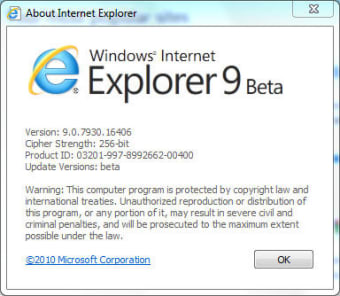
Internet Explorer 9 is a free internet browser for Microsoft Windows PC computers and laptops. Developed and published by Microsoft, IE 9 is compatible with Windows Vista and Windows 7 32-bit and 64-bit operating systems. There were a lot of new features added to this edition of Internet Explorer, such as increased speed, private mode, tabs, etc.
Top Recommended Alternative

Is Internet Explorer 9 still supported?
Released in 2011, Internet Explorer 9 has become an outdated software. While the developer, Microsoft, stated that IE9 was not going to receive further technical support or security updates, you can still download and install the online browser on compatible Windows operating systems. However, Internet Explorer 9 is not supported on Windows 8, Windows 10, or Windows XP systems.
The components of IE 9
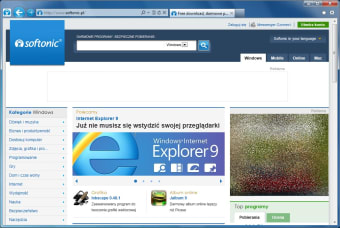
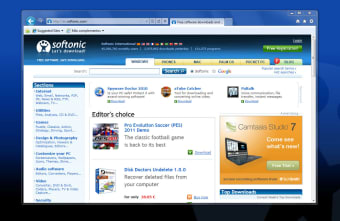
Internet Explorer 9 was a monumental upgrade from Internet Explorer 8 and the versions that came before that: Internet Explorer 7, Internet Explorer 6, etc. IE8 had a cluttered user interface, which the IE9 update fixed. The UI went from chaotic to minimalistic. The three icon lines found in IE 8 were reduced to a single command bar in IE 9.
The command line houses the main content in the Internet Explorer 9 web browser. The standard backward and forward buttons are on the left side of the line. The address bar is beside the two keys. The search, refresh, and stop icons are subtly placed along the URL bar. You can expand the dropdown menu next to the magnifying glass to search pages.
If there are issues loading website pages, then you can click on the arrow button next to the magnifying glass to refresh the content. The ‘X’ icon can immediately stop the refresh process on pages. The pages that are open in the browser are shown as tabs to the right of the location bar. There can be multiple tabs opened at once.
The logo and name of the website will be displayed within the tab beside the ‘X’ (that you can press to exit the webpage). To open a new tab, you'll just have to tap on the space next to the active website in the command line. The square will expand and read: ‘New Tab’. The page that automatically opens is where the most popular websites that you use are kept.
There are three icons on the right side of the command bar. If you click the home picture, then you will be brought to the default search engine. The star icon lets you access your favorite bookmarks. You can click on the settings icon to open the context menu and see options like print, zoom, etc.
Manage IE9’s performance
There are important features within the ‘New Tab’ page. IE9 will monitor your online searching habits and place the most visited websites in the center of the screen. Beneath the logo and name of the sites is a percentage bar that represents the amount of time that you frequent the URL. If you hover above the colored bars, then the status ‘Very active’ will be visible.
The webpages are categorized in descending order with the most popular page placed at the front of the line. Beneath the webpage preview section, you can find additional tools. You can click on the lightbulb icon to discover more sites that you might like. These sites are recommended based on the feedback that you have provided to the platform.
Adjacent to this item is the ‘Hide sites’ action. The dropdown arrow next to ‘Reopen closed tabs’ lets you review your browsing history and select a previous URL link to reopen. Alternatively, you can quickly launch the most recent site by choosing ‘Reopen last session’. If you do not want your PC to monitor your actions, then you can initiate ‘InPrivate Browsing’.
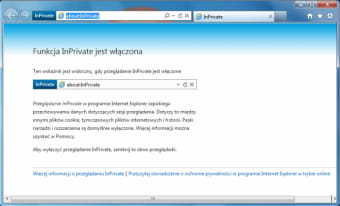
The Internet Explorer 9 browser cannot store your online data when the InPrivate mode is running. This includes not tracking cookie information, internet files, viewing history, contact data, etc.
While InPrivate lets you control the Microsoft software on your PC, the incognito mode does not block malicious malware from accessing your confidential data. You can tell when the privacy method is active because there will be an ‘InPrivate’ label located to the left of the address bar that lets you surf the web anonymously.
What is the latest version of Internet Explorer?
While you can still download and install Internet Explorer tools, the Microsoft Edge application replaced IE platforms in 2015. If you are looking for an alternative to Microsoft software, then Firefox, Google Chrome, and Safari are comparable search apps that you can install for free.
While Edge is native to Microsoft operating systems, Safari is an Apple product that comes with iOS devices: Macs, iPhones, etc. Firefox is regarded as the safest search browser in terms of protecting personal information from external and internal sources. Along with being the most secure, Firefox consumes the least amount of storage space on PCs.
While Google Chrome is often seen as the quickest browser, Safari is faster at loading pages on iOS devices. If there are multiple tabs open, then Firefox can load content quicker than Google Chrome does.
A user-friendly version of Internet Explorer
Internet Explorer 9 reveals a more concise user experience to PC owners compared to previous IE versions. During the installation process, the installer lets you choose from over 90 languages. The clean design includes helpful features: popular website preferences, private mode, etc.
What’s new?
While Internet Explorer 9 download is still available for specified Windows operating systems, the developers have ceased the development of improvements to the ninth version of IE. Microsoft replaced Internet Explorer with the Microsoft Edge app. You can visit their official website to read about their updates, company news, privacy policy, cookies, terms, etc.